

Auto-Publishing
Schedule content weeks in advance. IDEQO publishes automatically at the perfect time—no manual posting required.
You’ll connect your first platform to IDEQO so you can start scheduling and publishing content automatically. Once connected, you can schedule posts weeks in advance and publish them automatically—no manual posting required.
Time required: 2-5 minutes
What you’ll need: Admin access to the account you want to connect
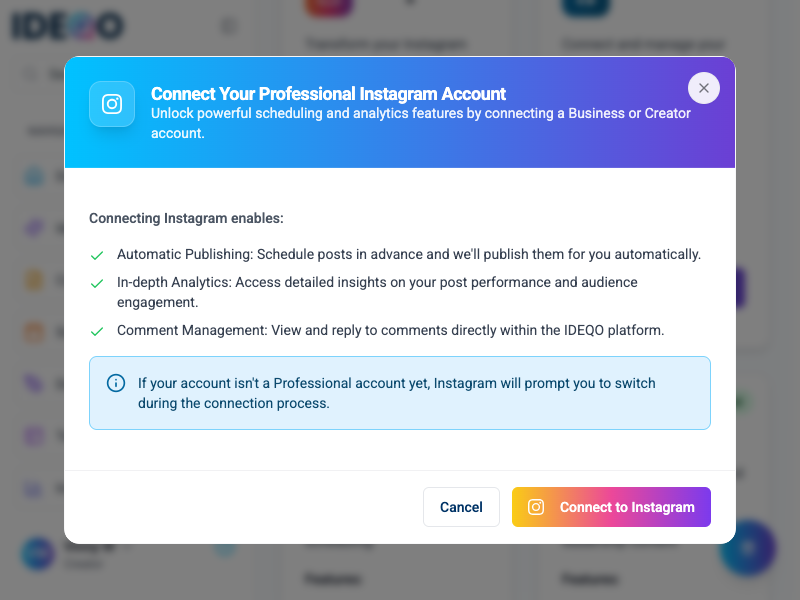
Once connected, you unlock powerful features:
Schedule content weeks in advance. IDEQO publishes automatically at the perfect time—no manual posting required.
Create once, publish everywhere. Schedule the same content across Instagram, LinkedIn, Twitter, and more.
Track engagement, reach, and performance metrics across all your connected platforms in one dashboard.
Visual calendar view shows all scheduled posts across platforms. Plan your content strategy at a glance.
Share integrations with your team. Collaborate on content and manage permissions per platform.
IDEQO suggests optimal posting times based on when your audience is most active.
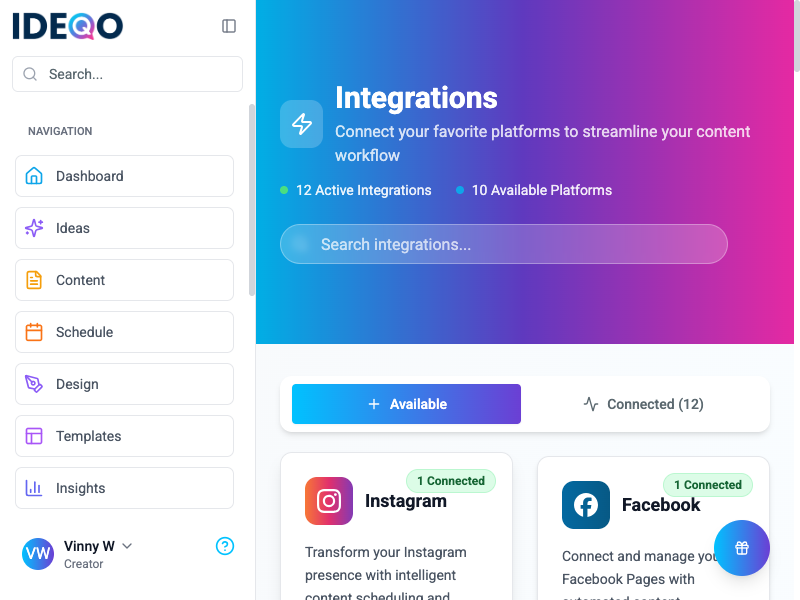
IDEQO connects with these platforms:
Schedule posts, Stories, and Reels automatically. Perfect for visual content and brand storytelling.
Connect and manage Facebook Pages and Groups with automated content publishing.
Build your professional brand with automated LinkedIn posting for Personal Profiles and Company Pages.
Amplify your reach with automated X posting, media uploads, and smart scheduling.
Upload videos directly to your YouTube channel with automated scheduling for Shorts and community posts.
Visual discovery platform perfect for lifestyle content, product inspiration, and board management.
Video scheduling, trend analytics, and creator tools for short-form content.
Sync products and collections to create shoppable posts and auto-generate product content.
Publish blog posts directly from IDEQO to your WordPress site. Coming soon.
Connect custom platforms and trigger automations with incoming and outgoing webhooks.
The connection process is the same for all platforms:
Most platforms require admin access. Key requirements:
For detailed requirements, see the platform-specific guides.
Create a simple test post scheduled for 5 minutes from now to verify everything works. Go to Create > New Post, select your connected platform, write a quick test message, and schedule it. Check your platform after 5 minutes to confirm it published automatically.
“Authorization failed” or “Permission denied”
“Account already connected”
“Connection expired”
“Post failed to publish”
For more help, see the full troubleshooting guide or contact support.
Now that your first platform is connected, here’s what to do next:
Create and schedule content now that your platform is connected. Use templates or AI to get started quickly. Start creating →
Add LinkedIn, Twitter, TikTok, and others to schedule across channels. Manage everything from one calendar. View all integrations →
Define your brand colors, fonts, and voice so every post stays on brand automatically. Create Brand Kit →
Plan a month of content and see everything scheduled at once. Drag and drop to reschedule. View calendar →
Need help? Contact support or check platform-specific guides.