

Your product pages are optimized. Your blog is live. You’ve installed an SEO app. And still, the organic traffic chart isn’t moving.
The problem might be sitting right in the middle of your Shopify admin, completely untouched: your collection pages.
Key Takeaways
- Collection pages can rank for broad commercial keywords like “women’s running shoes,” “minimalist wallets,” and “organic baby clothes” that no single product page can capture.
- Most Shopify stores leave collection pages with a default title, zero description, and no meta tags. That’s fixable in under an hour.
- Add a short keyword-rich intro above the product grid and 200-400 words of buying-guide content below it. Never push products below the fold.
- Shopify’s filter system can generate thousands of thin-content URLs that waste crawl budget. Handle them correctly or they’ll drag the whole site down.
- Schema markup feeds Google AI Overviews in 2026. Collection pages with structured data get cited; those without don’t.
- Internal links from blog posts to collection pages are one of the highest-ROI moves you can make. Most stores skip it entirely.
Why collection pages rank for keywords product pages can’t
A product page targets one item. “Blue New Balance 990v5 Women’s Running Shoe, Size 8.” That’s a highly specific search, and if someone types it in, they’re almost certainly buying. But very few people search that way.
Most shoppers start broader. “Women’s running shoes.” “Minimalist sneakers.” “Sustainable kids clothing.” These are high-volume commercial keywords. The kind that drive real traffic at scale. And the right page to target them isn’t a product page. It’s a collection page.
Organic search is consistently one of the top traffic channels for ecommerce stores. A well-optimized collection page can capture a meaningful share of that traffic for terms you’d otherwise need to pay for with ads.
The pattern shows up repeatedly among Shopify brands that invest in collection page SEO: significant organic growth where collection pages drive the majority of organic revenue, while product pages handle bottom-of-funnel searches. Collection pages own everything above that.
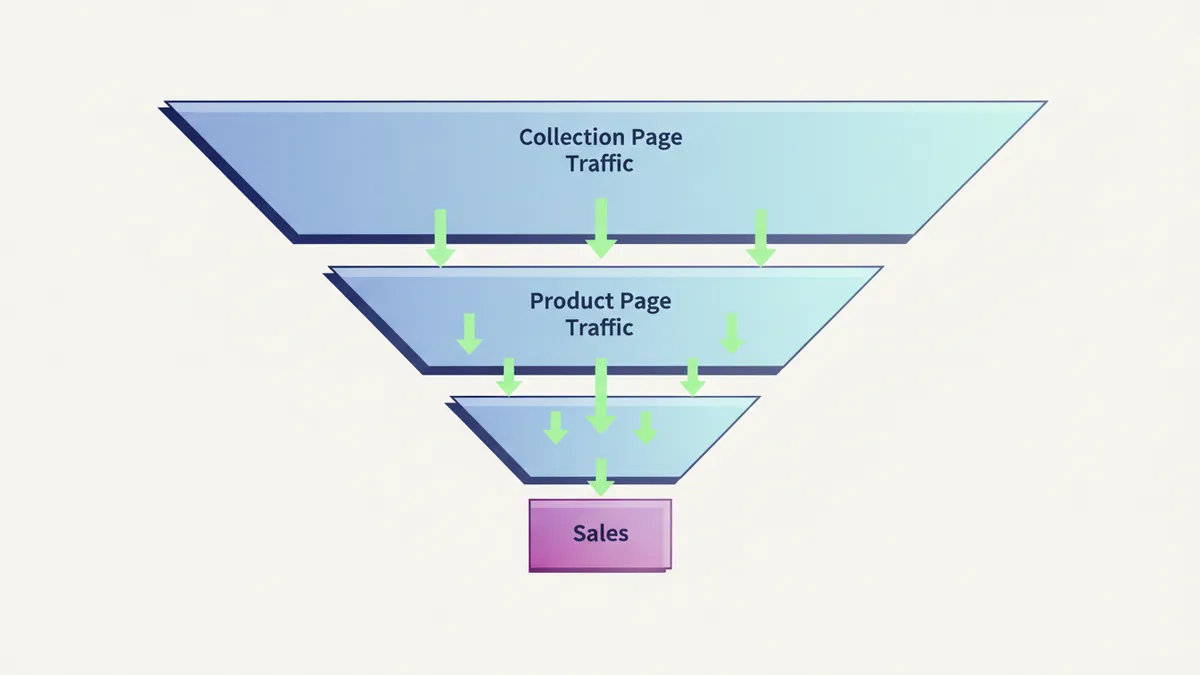
The opportunity is real. The problem is that most stores never act on it.
What an unoptimized collection page looks like
Open your Shopify admin and click into any collection. Look at the title field. Is it something like “T-Shirts” or “All Products” or “Summer Collection”? Open the SEO preview section. Is the meta description blank, or auto-pulled from the collection title?
If so, you’re not alone. Most Shopify stores leave collection pages with:
- Default or generic title tags (“Bags | StoreName”)
- No meta description, or the same description copy-pasted across multiple collections
- Zero description content. Just a grid of products.
- No internal links to or from blog posts
- No schema markup
Google sees a page with a thin title, no description, no text content, and no structured data. It has almost nothing to work with. The page won’t rank for much. This is the single most common SEO gap across Shopify stores, and it’s one of the fastest to fix.
One distinction before the fixes. Agentic Storefronts is catalog syndication to AI chats. Collection-page SEO is the storefront URL Google indexes. Do not treat them as the same toggle. Use the Shopify Agentic Storefronts guide for Sales channels > Agentic, then come back here for Products > Collections.
The five elements of an optimized collection page

1. Title tag. Your collection title is the H1 and the page title. It’s the primary signal Google uses to understand what the page is about. Use the target keyword, keep it under 60 characters, and be specific.
“Women’s Running Shoes” beats “Run Collection.” “Organic Baby Blankets” beats “New Arrivals: Spring.”
The formula: [Primary Keyword] | [Brand Name]. For competitive categories, add a differentiator: “Women’s Running Shoes: Free Returns | BrandName.”
2. URL handle. Shopify forces all collections to /collections/[handle]. You can’t change the structure, but you control the slug. Make it match your keyword. /collections/womens-running-shoes beats /collections/the-spring-run-series-2026.
3. Meta description. It’s not a direct ranking factor, but it controls your click-through rate. CTR is a behavioral signal Google watches. Write 150-160 characters. Match the searcher’s intent. Use a strong verb. “Shop 40+ women’s running shoes with free shipping and returns. Find trail, road, and track styles in sizes 5-13.” That earns clicks.
4. Description content (above and below the product grid). This is the piece most stores skip entirely.
Above the grid: 2-3 short sentences that include your primary keyword and tell shoppers what they’re looking at. Keep it tight. You don’t want to push products below the fold on mobile.

Below the grid: 200-400 words of buying-guide content. Cover what the collection includes, who it’s for, how to choose between product types, and a handful of natural long-tail keywords. This is where Google gets the content depth it needs.
To implement the split on Shopify, you’ll edit your collection-template.liquid file and use an HTML comment to designate where the split happens. Some themes support this natively, and apps like SEO Manager can handle it without code changes. For more on the best apps for this, see our breakdown of the best SEO apps for Shopify.
5. Internal links. Link from your blog posts to collection pages wherever the content is relevant. A post about “how to style a capsule wardrobe” should link to your basics collection. A buying guide for outdoor gear should link to your hiking boots collection. These links pass authority from your content pages to your highest-value commercial pages.
Also link between related collections. “You might also like” sections or sidebar collections (“Shop by category”) help Google understand your site hierarchy and help shoppers discover more.
How schema markup changes things in 2026
Schema was always useful. In 2026, it’s more important because it feeds Google’s AI Overviews directly.
When Google’s AI Overviews pull product information, buying guides, or FAQ answers, they source from pages with clean structured data. Pages without schema don’t get cited. Pages with it do. When your page gets cited in an AI Overview, you see significantly more organic clicks than pages that simply rank but don’t appear in the AI summary.
For collection pages, implement:

BreadcrumbList: Helps Google understand where this page sits in your site hierarchy and shows the path (Home > Footwear > Women’s Running Shoes) in search results.
ItemList: List the first 10-12 products on the page with their URLs. This gives Google a map of the collection.
FAQPage: Add 3-5 questions and answers about the collection covering buying guidance, sizing, and material questions. This is what surfaces in AI Overviews and featured snippets.
You can implement these via a custom Liquid snippet with JSON-LD, or through a Shopify SEO app that handles structured data automatically.
The faceted navigation trap
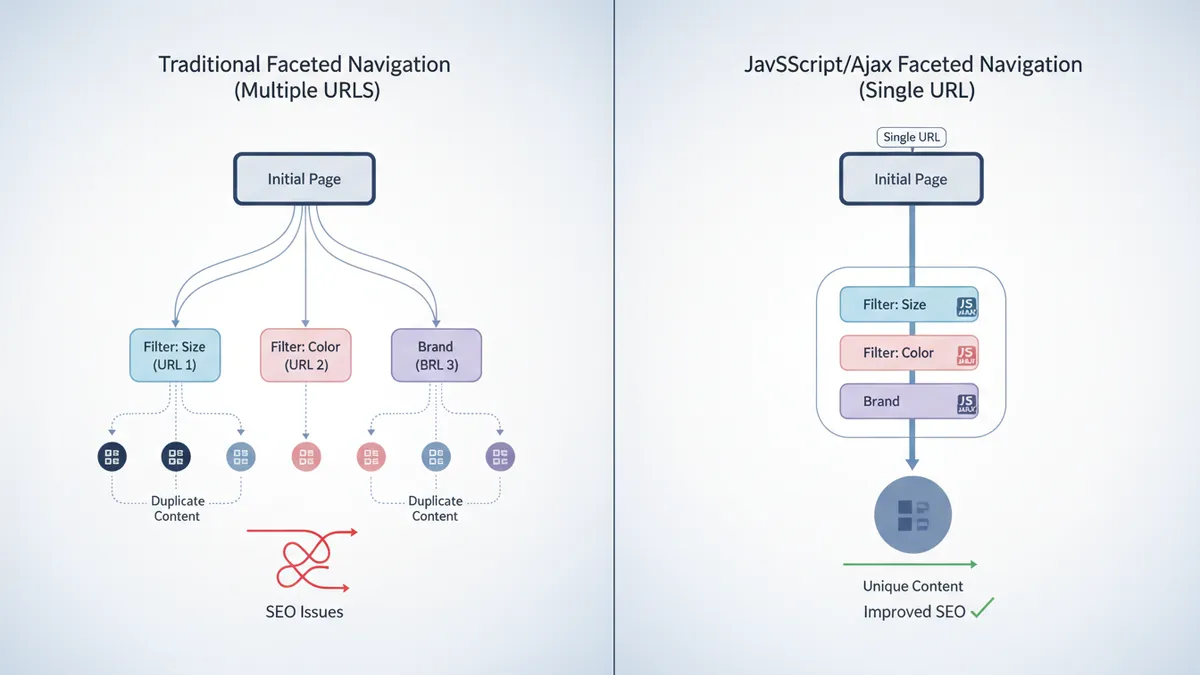
Most Shopify stores use filters: sort by price, filter by color, filter by size. This is great for shoppers. It can be a disaster for SEO.
Every filter combination generates a URL. /collections/running-shoes?sort_by=price-ascending, /collections/running-shoes?filter.p.tag=red, and so on. A store with 20 collections and 10 filter options can generate thousands of unique URLs. Each one looks like a separate page to Google.
Google crawls all of them. Finds mostly duplicate content. Spends crawl budget on low-value pages. Your real collection pages get less attention, and the filter URLs dilute the authority of the base URL.
Shopify applies noindex or canonical tags to many filter URLs by default, but not all, and not consistently. Check Google Search Console > Crawl Stats to see how many pages Google is crawling versus how many you actually want indexed.
The safest fix: implement filters using JavaScript and Ajax so filter selections update the page content without generating new URLs. If you can’t do that, apply noindex,follow to filter parameter pages. This keeps them out of Google’s index while still allowing link equity to flow.
For a deeper look at Shopify’s SEO foundations and how to handle technical issues across the store, the complete Shopify SEO guide covers the full picture.
How to audit your collection pages in 20 minutes
Open your Shopify admin and go to Products > Collections. Go through each active collection and check:
Title: Does it include the target keyword? Is it under 60 characters? Is it specific?
Description: Is there any content at all? If the field is empty, add it now.
SEO preview (under “Search engine listing preview”): Is the meta description filled in? Does it match the intent of someone searching for this category?
URL handle: Does it include the keyword? Is it clean and readable?
Prioritize your highest-traffic collections first. Look at Google Search Console to see which collection pages are getting impressions but low clicks. Those are your biggest quick wins. An optimized title and meta description alone can meaningfully move CTR.
Once the basics are fixed, layer in the content (above/below fold), then tackle schema. The full optimization doesn’t have to happen in one session.
IDEQO’s content calendar makes it easy to plan blog posts that support your SEO strategy and link back to your collection pages. A blog post that links to a collection page isn’t just content. It’s a link-building move.
For more on building a blog strategy that fuels collection page rankings, see Shopify blog SEO strategy. And if you’re looking for tools to speed up content creation for those supporting blog posts, IDEQO’s free tools suite covers caption generation, content calendars, and more.
Start with your three biggest collection pages
Pick the three collection pages that represent your highest-value product categories. Optimize the title, write the meta description, add 200 words above the grid, and add 300 words below it. Link to each one from at least two existing blog posts.
Do that this week. Check rankings in 4-6 weeks.
Collection pages are where organic traffic actually converts. Product pages close the sale. Collection pages bring the shopper to the store. Optimize them, and you’re building a traffic source that doesn’t stop when your ad budget runs out.
Frequently Asked Questions
What is Shopify collection page SEO?
Shopify collection page SEO is the process of optimizing your collection (category) pages so they rank on Google for high-volume commercial keywords. This includes writing keyword-rich titles, adding unique descriptions, optimizing meta tags, building internal links, and adding schema markup. Collection pages can rank for broad terms like 'women's running shoes' that no single product page can capture.
How do I add a description to a Shopify collection page?
Go to your Shopify admin, click Products > Collections, and select the collection you want to edit. You'll see a Description field where you can add content above the product grid. For SEO content below the product grid, you'll need to edit your collection-template.liquid file or use a Shopify app that supports split content sections.
Do collection pages rank better than product pages on Google?
For high-volume commercial keywords, yes. A product page for a specific blue running shoe targets one exact-match query. A collection page for 'women's running shoes' targets a category that gets far more searches. Properly optimized collection pages often outrank product pages for these broader, higher-volume terms.
Should I noindex Shopify filter pages?
For presentation-based filters like 'sort by price' or 'show 100 per page,' yes. Apply noindex,follow to prevent thin content from entering Google's index while keeping link equity flowing. For filters that create genuinely useful landing pages (e.g., a specific color or size that has search volume), consider whether those pages deserve to be indexed on their own. Check Google Search Console for crawl budget issues.
How long should the description be on a Shopify collection page?
Add 2-3 sentences above the product grid: just enough to include your primary keyword and tell Google what the page is about without pushing products below the fold. Below the product grid, aim for 200-400 words covering what the collection includes, who it's for, and relevant long-tail keywords. The split approach keeps the shopping experience clean while giving Google enough content to index.