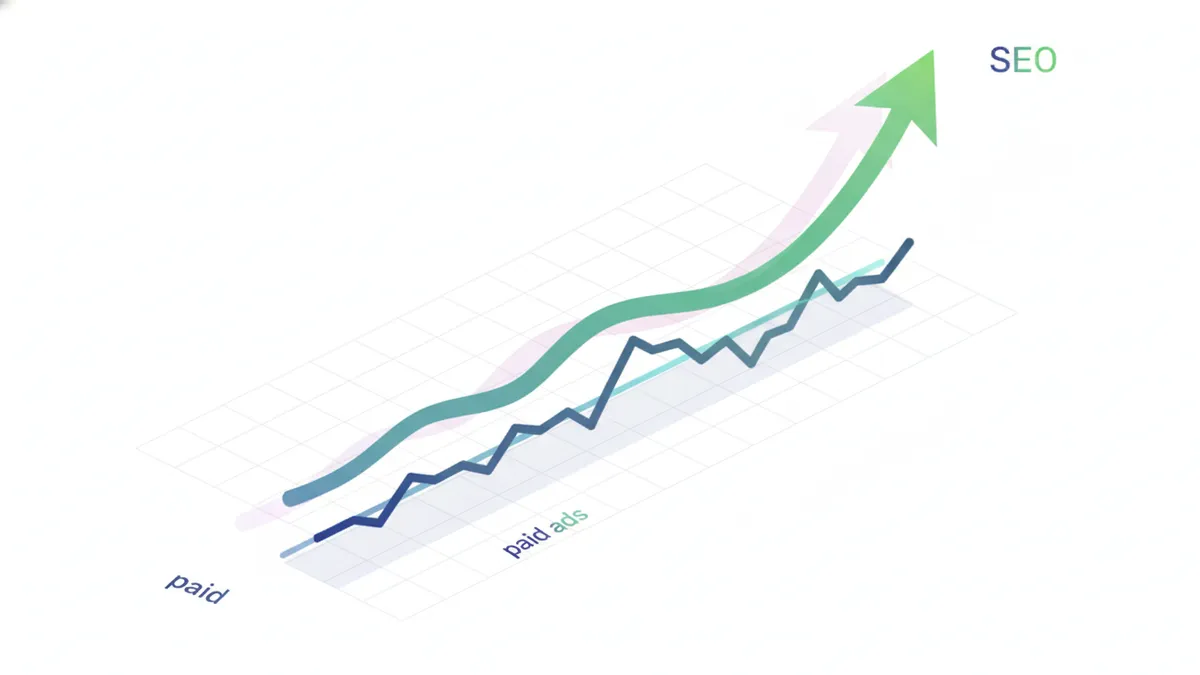
Most Shopify stores rely on paid ads for traffic. When the ad budget stops, so do the sales. SEO is the opposite. It compounds. Every optimized page, every blog post, every backlink builds on itself over time.
Key Takeaways
- Product pages are your SEO foundation. Optimize titles, descriptions, and images for the keywords your customers actually search.
- Collection pages are hidden gems. They can rank for high-volume category keywords that product pages can’t.
- Blog content drives free traffic. Target informational keywords that bring potential buyers to your store before they’re ready to purchase.
- Technical SEO is table stakes. Site speed, mobile optimization, and structured data determine whether Google even considers ranking you.
- Content marketing makes SEO sustainable. One-time optimization gets you started. Ongoing content keeps you growing.
Why SEO matters more than ads for Shopify stores
Paid ads are a faucet. Turn them on, traffic flows. Turn them off, it stops. For most Shopify stores, 70-80% of traffic comes from paid sources. That’s expensive and fragile.
SEO-driven traffic is different. A product page that ranks on Google sends you visitors every day without additional spend. A blog post that ranks for a relevant keyword keeps driving traffic for months or years.
The math is simple. If you spend $2 per click on ads and get 1,000 visitors a month, that’s $2,000. If an optimized blog post brings in 1,000 visitors a month for free, that’s $24,000 in saved ad spend over a year. From one post.
SEO takes longer to see results. But once it works, it keeps working.
How Shopify SEO works
Shopify handles many SEO basics automatically. It generates sitemaps, creates canonical tags, and uses clean URL structures. But the platform only gives you the foundation. You still need to do the work on top of it.
What Shopify does for you
- Auto-generated sitemap.xml that updates when you add pages
- Canonical tags on all pages to prevent duplicate content issues
- SSL certificates for secure browsing (HTTPS)
- Mobile-responsive themes that pass Google’s mobile-first indexing
- Editable meta titles and descriptions on every page type
What you need to do yourself
- Write unique, keyword-rich product titles and descriptions
- Optimize collection pages with original content
- Create blog posts targeting informational keywords
- Compress images and add descriptive alt text
- Build internal links between related pages
- Earn backlinks from other websites
Think of Shopify as the stage. You still need to perform.
Product page SEO: your highest-priority pages
Product pages are where sales happen. They’re also the pages most likely to rank for commercial keywords like “organic cotton baby blanket” or “minimalist leather wallet.”
Optimize your product titles
Your product title is the single most important on-page SEO element. Google uses it as the primary ranking signal for that page.
Rules for SEO product titles:
- Put the most important keyword first. “Organic Cotton Baby Blanket” beats “The Luna Collection: Baby Blanket in Organic Cotton.”
- Include key product attributes. Material, color, size, or use case.
- Keep it under 60 characters so it doesn’t get cut off in search results.
- Write for humans first, search engines second. It still needs to make sense.
| Before | After |
|---|---|
| The Classic Tote | Canvas Tote Bag for Women, Large, Everyday Carry |
| Serenity Candle | Lavender Soy Candle, 8oz, Hand-Poured |
| Power Band Set | Resistance Bands Set, 5 Levels, Home Workout |
Write product descriptions that rank and convert
Most Shopify stores copy the manufacturer’s description or write a couple of generic sentences. That’s a missed opportunity.

What Google wants to see:
- Unique content. Don’t copy descriptions from your supplier. Google ignores duplicate content.
- Natural keyword usage. Include your target keyword and variations 2-3 times. Don’t stuff.
- Benefit-focused copy. Describe what the product does for the buyer, not just what it is.
- 300+ words minimum. Longer descriptions give Google more context to understand your page.
- Structured format. Use bullet points, short paragraphs, and subheadings within the description.
A strong product description answers three questions: What is it? Why should I buy it? What makes it different? We’ll cover this in depth in our upcoming guide on writing SEO product descriptions for Shopify.
Optimize product images
Google Image Search drives significant e-commerce traffic. Every product image is a ranking opportunity.
- Compress images before uploading. Use tools like TinyPNG or Shopify’s built-in compression.
- Write descriptive alt text. “Women’s leather crossbody bag in tan” beats “IMG_4523.”
- Use descriptive filenames. Rename files before uploading.
leather-crossbody-bag-tan.jpgis better thanphoto1.jpg. - Add multiple images. Products with 5+ images get more engagement and give Google more content to index.
Already have great product photos? Turn them into social media content that drives traffic back to your store from multiple platforms.
Structured data for product pages
Structured data (schema markup) tells Google exactly what your page is about. For product pages, this means showing price, availability, and reviews directly in search results. Those rich results get significantly higher click-through rates.
Shopify themes handle basic product schema automatically. But check yours by running a product page URL through Google’s Rich Results Test. If it’s missing, apps like JSON-LD for SEO can add it.
Collection page SEO: the most overlooked opportunity
Most Shopify stores treat collection pages as simple product grids. No unique content, no optimization. That’s a mistake. Collection pages can rank for high-volume category keywords that individual product pages can’t.
“Running shoes for women” gets far more searches than any single shoe product name. Your collection page is the right page to target that keyword.
How to optimize collection pages
Add unique content above or below the product grid. Write 200-400 words describing the collection. Include your target keyword naturally. Explain what makes these products great and who they’re for.
Write keyword-rich collection titles. “Women’s Running Shoes” is better than “Spring Collection” for SEO. The title becomes the H1 tag and the primary ranking signal.
Optimize the meta title and description. Shopify lets you edit these under each collection’s settings. Include the target keyword in both.
Internal link from blog posts. When you write about running tips, link to your running shoes collection. This sends authority from your content to your product pages.
Blog SEO: driving free traffic with content
Your product and collection pages target people who already know what they want. Blog content targets everyone else. The people who haven’t discovered your brand yet but are searching for topics related to what you sell.
A home decor store can rank for “how to style a small living room.” A skincare brand can rank for “best nighttime skincare routine for dry skin.” These searches bring in potential customers who didn’t know your store existed.
What to blog about
Focus on topics your target customers search for. Not topics about your products, but topics about their interests and problems.
Keyword research is the starting point. Use tools like Google Keyword Planner, Ubersuggest, or Ahrefs to find what your audience searches for. Look for keywords with decent search volume (100+ monthly searches) and low to medium competition.
Content types that work for Shopify blogs:
- How-to guides related to your niche
- Buying guides and comparison posts
- Seasonal content (gift guides, holiday shopping)
- Educational content that builds authority
- Listicles (top 10, best of, etc.)
Blog post optimization basics
- Target one primary keyword per post. Use it in the title, first paragraph, one H2, and meta description.
- Write 1,500+ words. Longer, comprehensive content ranks better for informational queries.
- Use H2 and H3 headings. Structure matters for both readers and search engines.
- Add internal links. Link to your products, collections, and other blog posts. Every internal link passes authority.
- Include images. Posts with images get more engagement. Add alt text with relevant keywords.
Your blog is also the perfect content source for social media. Plan your blog topics alongside your social media content calendar so every post does double duty.
Technical SEO for Shopify
Technical SEO ensures Google can crawl, index, and rank your store properly. Most Shopify stores have a solid technical foundation, but there are common issues to watch for.
Site speed
Google uses page speed as a ranking factor. Slow stores also lose sales. A 1-second delay in load time can reduce conversions by 7%.
Quick speed wins for Shopify:
- Compress all images before uploading
- Remove unused apps (they add scripts that slow your store)
- Use a fast, lightweight theme (Dawn is Shopify’s best performer)
- Minimize custom code in your theme
- Enable lazy loading for images below the fold
- Use Shopify’s built-in CDN (it’s automatic)
Test your store speed with Google PageSpeed Insights and aim for a score above 70 on mobile.
Mobile optimization
Google uses mobile-first indexing. That means it primarily uses the mobile version of your site for ranking. If your store looks bad on mobile, your SEO suffers.
Most modern Shopify themes are mobile-responsive out of the box. But test yours. Browse your store on your phone. Check that:
- Text is readable without zooming
- Buttons and links are easy to tap
- Images load quickly
- The checkout process works smoothly
- Navigation is intuitive
URL structure
Shopify’s URL structure is mostly fixed. Products always live at /products/slug and collections at /collections/slug. You can’t change this hierarchy, but you can control the slugs.
URL best practices:
- Keep slugs short and descriptive.
/products/leather-crossbody-bagbeats/products/the-luna-collection-crossbody-bag-in-genuine-italian-leather. - Include your primary keyword in the slug.
- Use hyphens, not underscores.
- Don’t change URLs after publishing unless absolutely necessary. Broken URLs lose all accumulated SEO value.
Canonical tags and duplicate content
Shopify creates multiple URLs for the same product (e.g., through collection paths). It handles canonical tags automatically in most cases, but verify they’re working. The canonical URL should always point to the main /products/slug version.
If you have products that are very similar (like color variants), make sure each has unique content. Duplicate product descriptions across variants can dilute your SEO.
Sitemap and robots.txt
Shopify auto-generates your sitemap at yourstore.com/sitemap.xml. It includes all products, collections, pages, and blog posts. You can’t edit it directly, but you can control what’s included by publishing or unpublishing pages.
Shopify’s robots.txt is also auto-generated. It blocks checkout pages and internal search results from being crawled, which is correct. Limited customization is available through the Shopify admin.
Internal linking strategy
Internal links are the most underused SEO tool for Shopify stores. They help Google understand your site structure, distribute page authority, and keep visitors on your site longer.
How to build internal links
Link from blog posts to product and collection pages. Every blog post should link to at least one relevant product or collection. “If you’re styling a small living room, check out our [minimalist coffee tables collection].”
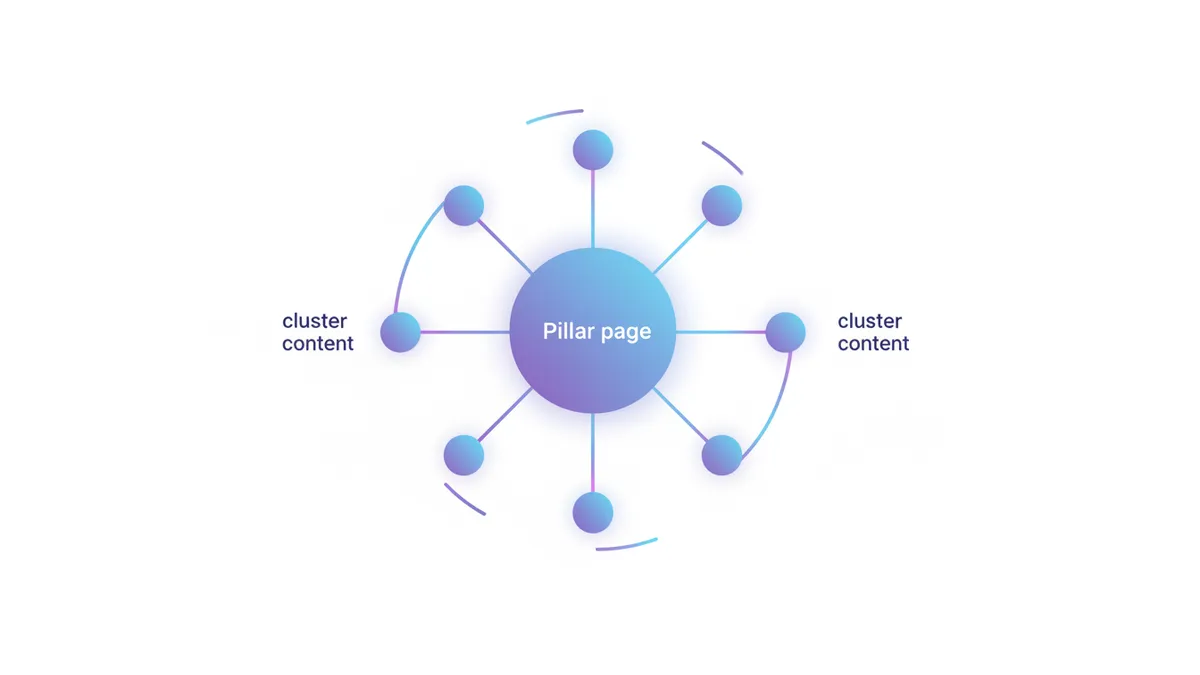
Link between related blog posts. When you mention a topic covered in another article, link to it. This builds topical clusters that signal expertise to Google.
Link from product pages to blog content. If you have a blog post about “how to care for leather bags,” link to it from your leather bag product pages. It adds value for the customer and strengthens the content connection.
Use descriptive anchor text. “Learn how to optimize your product descriptions” is better than “click here” or “read more.” Anchor text tells Google what the linked page is about.
If you’re building a content strategy across social media and your blog, a content calendar for your Shopify store helps you plan internal linking opportunities ahead of time.
Keyword research for Shopify stores
Keywords are the foundation of every SEO strategy. The right keywords bring buyers. The wrong ones bring browsers who never purchase.
Types of keywords for e-commerce
| Type | Example | Intent | Best Page Type |
|---|---|---|---|
| Product keywords | ”organic cotton baby blanket” | Commercial | Product page |
| Category keywords | ”baby blankets” | Commercial | Collection page |
| Informational keywords | ”best fabric for baby blankets” | Research | Blog post |
| Brand keywords | ”your store name” | Navigational | Homepage |
| Long-tail keywords | ”organic cotton baby blanket for newborn gift” | High commercial | Product page or blog |
Where to find keywords
- Google Autocomplete. Start typing a product-related query and see what Google suggests.
- Google Keyword Planner. Free with a Google Ads account. Shows search volume and competition.
- Competitor research. Search for a competitor’s product. What keywords do they rank for?
- Customer language. Read your reviews and support tickets. The words customers use are the words they search.
- “People Also Ask” boxes. Google shows these for most queries. Each question is a potential blog topic or FAQ.
Matching keywords to pages
Every keyword should map to one specific page. Don’t target the same keyword on multiple pages, that’s called keyword cannibalization and it confuses Google.
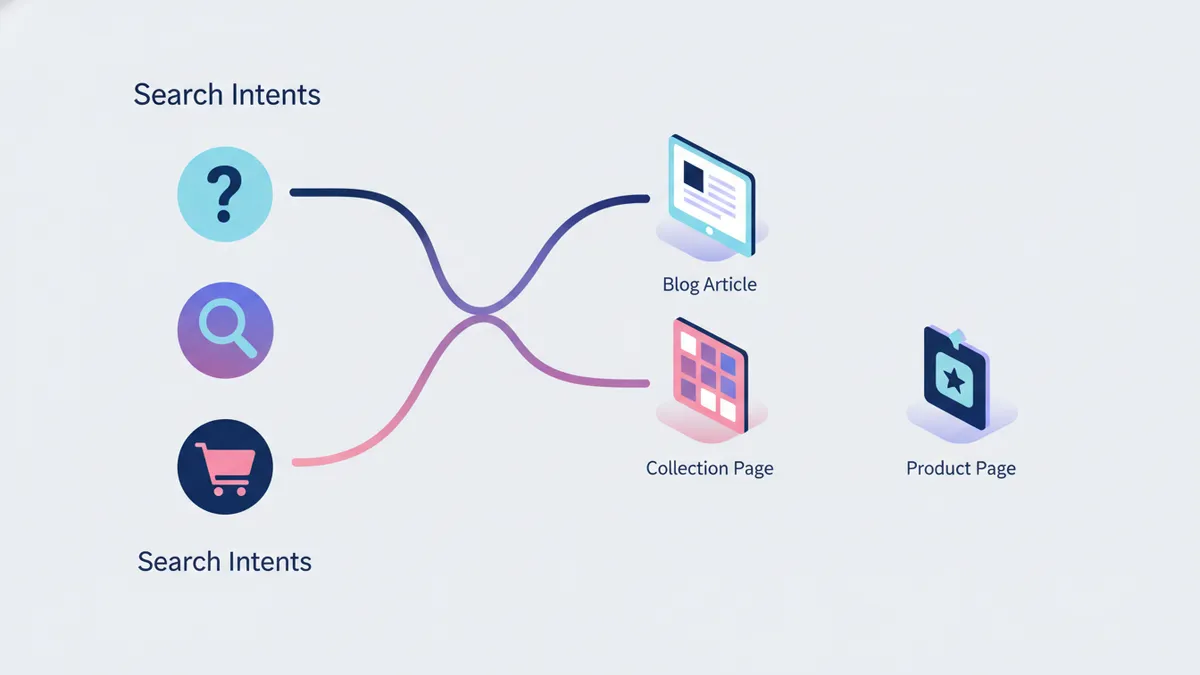
- High-volume, commercial keywords → Collection pages
- Specific product keywords → Product pages
- Informational, how-to keywords → Blog posts
- Long-tail, high-intent keywords → Product pages or dedicated landing pages
We’ll cover keyword research in much more depth in our upcoming e-commerce keyword research guide.
Content marketing: making SEO sustainable
One-time SEO optimization gets you started. Content marketing keeps you growing. Every blog post you publish is a new page Google can rank. Every piece of content is a new entry point for potential customers.
Why content marketing matters for Shopify stores
It builds topical authority. When you publish multiple pieces of content about a topic (e.g., home decor, skincare routines, fitness gear), Google recognizes you as an authority. That authority lifts the rankings of all your pages, including product pages.
It captures top-of-funnel traffic. Most people don’t start their buying journey with a product search. They start with a question. Content catches them at that stage and guides them toward your products.
It creates link-worthy assets. Other websites link to helpful guides, original research, and useful tools. They don’t link to product pages. Blog content earns the backlinks that boost your entire store’s authority.
Building a content engine
A sustainable content strategy requires a system, not just inspiration.
- Research keywords your audience searches for (covered above).
- Plan content in clusters. Group related topics around pillar pages. This builds topical authority faster than random blog posts.
- Create a publishing schedule. One to two blog posts per week is a strong cadence for most Shopify stores.
- Promote every post. Share on social media, email it to your list, and use it as content for your social media platforms.
- Update older posts. Refresh content with new data, current year references, and improved information. Google rewards freshness.
If you’re already investing in social media content, align your blog strategy with your social media automation workflow. One blog post can become 5-10 social posts across platforms.
Using AI to scale content creation
Writing 1-2 blog posts per week is demanding for a small team. AI tools can accelerate the process without sacrificing quality.
The workflow that works: use AI to generate research outlines and first drafts, then edit heavily for your brand voice and unique perspective. AI handles the blank-page problem. You add the expertise and personality.
For a deeper dive on using AI for your e-commerce content, check out our AI content creation guide for e-commerce stores.
Local SEO for Shopify stores
If you have a physical location or serve a specific geographic area, local SEO brings in nearby customers searching for what you sell.
Google Business Profile
Claim and optimize your Google Business Profile. Add your store name, address, phone number, website, hours, and photos. Respond to reviews. Post updates regularly.
Local keywords
Include your city or region in key pages. “Handmade jewelry in Austin” or “organic skincare Portland” are valuable local keywords. Add them to your homepage meta title, your about page, and relevant blog posts.
NAP consistency
Your Name, Address, and Phone number should be identical everywhere online. Your website, Google Business Profile, Yelp, Facebook, and any directories should all match exactly. Inconsistencies confuse Google and hurt local rankings.
Measuring your Shopify SEO results
SEO without measurement is guessing. Track these metrics monthly to know what’s working.
Key metrics
| Metric | Tool | What It Tells You |
|---|---|---|
| Organic traffic | Google Analytics | How many visitors come from search |
| Keyword rankings | Google Search Console, Ahrefs | Where you rank for target keywords |
| Click-through rate | Google Search Console | How often searchers click your listing |
| Organic revenue | Shopify Analytics | How much money organic traffic generates |
| Indexed pages | Google Search Console | How many of your pages Google has indexed |
| Page speed | PageSpeed Insights | Whether speed is hurting your rankings |
What good progress looks like
- Month 1-2: Technical fixes done, product pages optimized, first blog posts published. Minimal traffic change.
- Month 3-4: New pages start appearing in search results. Long-tail keywords begin ranking.
- Month 6: Collection pages and blog posts gain traction. Organic traffic grows noticeably.
- Month 12: Compounding effect. Older content climbs in rankings. New content ranks faster because of site authority.
SEO is a long game. If someone promises page-one rankings in 30 days, they’re selling something that won’t last.
Common Shopify SEO mistakes
Duplicate product descriptions. Copying manufacturer descriptions that appear on dozens of other stores. Google has no reason to rank your version. Write unique copy for every product.
Ignoring collection pages. Leaving them as empty product grids. Add unique content and optimize titles. Collection pages can outrank individual products for category searches.
No blog. Without a blog, you’re limited to product and collection keywords. A blog opens up thousands of informational keywords that bring potential customers to your store.
Thin content everywhere. Product pages with one sentence. Blog posts with 300 words. Google rewards comprehensive, helpful content. If your page doesn’t answer the searcher’s question better than the competition, it won’t rank.
Not building internal links. Pages with no internal links are islands. Google can’t find them easily, and they don’t benefit from the authority of your other pages.
Changing URLs without redirects. If you change a product URL, the old URL loses all its SEO value. Always set up 301 redirects when changing URLs.
Ignoring page speed. Installing 15 apps that each add scripts to your store. Every app slows your site. Audit your apps quarterly and remove anything you’re not actively using.
Best SEO apps for Shopify stores
Shopify’s built-in SEO covers the basics, but the right apps help you scale. Here are the best SEO apps for Shopify stores in 2026, broken down by what they actually do.
Technical SEO apps
- Smart SEO. Auto-generates meta tags, alt text, and JSON-LD structured data in bulk. Saves hours if you have hundreds of products. Handles the repetitive work so you can focus on writing unique content.
- SEO Manager. Real-time SEO scoring as you edit pages. Shows keyword usage, meta length, and readability. Useful for store owners who want guardrails while they learn.
- Plug in SEO. Scans your store for broken links, missing alt text, and duplicate content. Good for quarterly audits.
Content and keyword apps
- IDEQO. Not a traditional SEO app — but handles the content side of SEO that most tools miss. Generate AI product descriptions that rank, plan blog content, and distribute posts across social media. If your bottleneck is content creation rather than technical SEO, this fills the gap. Start free with IDEQO.
- Bloggle. Enhanced blog editor for Shopify with better formatting options than the default editor. Helpful if you publish frequently and want more control over layout.
Backlink and authority apps
- Ahrefs Webmaster Tools (free). Not a Shopify app, but essential. Connect your store to see which keywords you rank for, which pages get organic traffic, and where backlink opportunities exist.
- Shogun or GemPages. Landing page builders that let you create SEO-optimized content pages beyond the default Shopify templates. Useful for building pillar pages and resource hubs.
When to add SEO apps
Don’t install five apps on day one. Start with manual optimization — fix your product titles, write unique descriptions, add alt text. Once you’ve done the fundamentals, add apps to scale what’s already working. Every app adds JavaScript to your store and can slow page speed, so only keep what you actively use.
Your Shopify SEO action plan
Here’s where to start, in order of impact:
- Optimize your top 20 product pages. Start with your best sellers. Fix titles, descriptions, images, and alt text.
- Add content to your top 5 collection pages. Write 200-400 words of unique, keyword-rich content for each.
- Fix technical basics. Compress images, check mobile experience, verify structured data.
- Start a blog. Publish one post per week targeting informational keywords in your niche.
- Build internal links. Connect your blog posts to products and collections. Link between related content.
- Track monthly. Set up Google Search Console and Google Analytics. Review organic traffic and keyword rankings every 30 days.
SEO isn’t a one-time project. It’s an ongoing investment that pays compounding returns. Every page you optimize, every post you publish, and every link you build makes the next one more effective.
Ready to turn your Shopify store into a content engine? Start free with IDEQO and plan your blog content, social media posts, and product marketing from one dashboard. Free plan available. No credit card required.
Frequently Asked Questions
How long does SEO take to work for a Shopify store?
Most Shopify stores start seeing organic traffic improvements within 3 to 6 months of consistent SEO work. Quick wins like fixing meta titles and product descriptions can show results in weeks. Competitive keywords take longer. The key is consistency. SEO compounds over time.
Do I need an SEO app for Shopify?
Shopify handles basic SEO well out of the box. Apps like SEO Manager or Smart SEO help with bulk editing meta tags, generating structured data, and fixing technical issues. For content-focused SEO, tools like IDEQO handle AI product descriptions and blog planning. But no app replaces good keyword strategy. Start with manual optimization, then add apps for scale. See our full breakdown of the best SEO apps for Shopify above.
Is Shopify good for SEO compared to other platforms?
Yes. Shopify generates clean URLs, handles canonical tags, creates sitemaps automatically, and supports structured data. Its main limitations are rigid URL structures and limited control over robots.txt. For most small to mid-size stores, Shopify SEO is more than capable of driving significant organic traffic.
What is the most important SEO factor for Shopify stores?
Product page optimization. Your product titles, descriptions, and images are what Google indexes and shoppers search for. A well-optimized product page with the right keywords, compelling copy, and fast load times will outperform any other SEO tactic.
Should Shopify stores have a blog for SEO?
Absolutely. A blog lets you target informational keywords that product pages can't rank for. 'How to style a small living room' brings in potential buyers who aren't searching for your product directly but are in your target audience. Blog content builds topical authority and drives free traffic.