
Your product pages can only rank for so many keywords. They target people who already know what they want. A blog targets everyone else. The people searching for answers, ideas, and inspiration who could become your next customers.
Key Takeaways
- Blog content targets informational keywords that product pages can’t rank for. “How to style a small kitchen” brings in future kitchen product buyers.
- One post per week is enough to start. Consistency beats volume. Publishing regularly signals Google that your site is active.
- Every post should target one primary keyword. Use it in the title, URL, first paragraph, and one H2 heading.
- Internal links are the secret weapon. Link every blog post to relevant products and collections. This is how blog traffic turns into sales.
- Promote every post on social media. A blog post that nobody sees can’t rank. Initial traffic and engagement signal quality to Google.
Why your Shopify store needs a blog
Product pages target commercial keywords. “Buy leather wallet” or “organic baby blanket.” These searches have high purchase intent but limited volume. And every competitor is targeting them too.
Blog content opens up thousands of informational keywords. These are the searches people make before they’re ready to buy.
A leather goods store can rank for “how to care for leather bags.” A baby product store can rank for “newborn essentials checklist.” A fitness brand can rank for “home workout routine for beginners.”

Each of these posts brings in potential customers who didn’t know your store existed. They come for the information. They stay for the products.
The math behind blog traffic
One well-optimized blog post targeting a keyword with 500 monthly searches can realistically capture 10-20% of that traffic once it ranks. That’s 50-100 visitors per month from one post. For free.
Publish 50 posts over a year. Even if only half rank well, that’s 1,250-2,500 free visitors per month. At a 2% conversion rate, that’s 25-50 sales per month from organic blog traffic alone.
Now compare that cost to paying $2 per click on Google Ads. The blog saves you $2,500-5,000 per month in ad spend. And the traffic keeps coming as long as the content exists.
Setting up your Shopify blog for SEO

Before you write a single post, get the technical foundation right.
Blog URL structure
Shopify creates your blog at yourstore.com/blogs/news by default. You can create additional blogs with different names, but keep it simple. Most stores should use one blog called “blog” or “journal.”
The URL for each post follows the pattern: yourstore.com/blogs/news/post-slug. Make sure your post slugs are short, descriptive, and include your target keyword. “leather-bag-care-guide” beats “how-to-properly-care-for-your-leather-bags-tips-and-tricks.”
Meta tags on every post
Shopify lets you edit the SEO title and meta description for every blog post. Don’t skip this.
- SEO title: Include your primary keyword near the front. Keep it under 60 characters.
- Meta description: Summarize the post in 155 characters. Include the keyword and a reason to click.
If you leave these blank, Shopify uses the post title and first paragraph text. The auto-generated versions are almost always worse than what you’d write yourself.
Featured images and alt text
Every post should have a featured image. Google Image Search is a traffic source too. Write descriptive alt text that includes your target keyword naturally. “Leather bag care guide showing cleaning supplies” is better than “blog header image.”
How to find blog topics that drive traffic
Not every topic is worth writing about. The goal is to find keywords with enough search volume to be worth your time and low enough competition that you can actually rank.
Three sources for blog topic ideas
1. Google Autocomplete and “People Also Ask”
Type a topic related to your products into Google. The autocomplete suggestions and “People Also Ask” boxes show real questions your audience asks. Each one is a potential blog post.
For a leather goods store, typing “leather wallet” might surface:
- “how to break in a new leather wallet”
- “best leather wallet for men”
- “leather wallet vs fabric wallet”
2. Your customer questions
Your support inbox and product reviews are goldmines. What do customers ask before buying? What do they mention in reviews? These questions are the exact content your blog should answer.
If five customers ask “what’s the difference between full-grain and top-grain leather,” that’s a blog post. And if they’re asking you, they’re also searching Google.
3. Competitor blogs
Look at what your competitors blog about. If a topic works for them, it can work for you. But don’t just copy. Write something more comprehensive, more current, or more specific to your audience.
Use tools like Ubersuggest or Ahrefs to see which competitor blog posts get the most organic traffic. That tells you exactly which topics are worth targeting.
For a structured approach to keyword research, our complete Shopify SEO guide covers the full process, including the best SEO apps for Shopify to help you scale.
Writing blog posts that rank
A blog post that ranks on Google is structured, comprehensive, and optimized for a specific keyword. Here’s the framework.
Target one primary keyword per post
Every post should focus on one main keyword. Don’t try to rank for five keywords in one article. You’ll dilute your focus and rank for none of them.
| Post Topic | Primary Keyword | Search Intent |
|---|---|---|
| How to care for leather bags | leather bag care guide | Informational |
| Best gifts for new homeowners | gifts for new homeowners | Commercial |
| Skincare routine for dry skin | dry skin routine | Informational |
Post structure that Google loves
Title (H1): Include the primary keyword. Make it specific and actionable. “How to Care for Leather Bags: A Complete Guide” beats “Leather Care Tips.”
Introduction (first 100 words): State the problem or question. Include the primary keyword naturally. Tell the reader what they’ll learn.
H2 sections: Break the post into logical sections. Each H2 should be a subtopic or step. Include keyword variations in 1-2 H2 headings.
H3 subsections: Use for detailed breakdowns within an H2 section.
Conclusion: Summarize the key points. Include a call to action.
Content depth matters
Google ranks comprehensive content higher than surface-level posts. If you’re writing about leather bag care, cover:
- Cleaning methods for different leather types
- Products to use and avoid
- How often to condition leather
- Storage tips
- Common mistakes
- When to take it to a professional
A 300-word post touching on each topic lightly will lose to a 2,000-word post that covers each one thoroughly. Depth signals expertise to Google.
Formatting for readability
- Short paragraphs. 2-3 sentences max. Mobile readers need white space.
- Bullet points and numbered lists. Easy to scan and often pulled into featured snippets.
- Tables. Great for comparisons. Google loves structured data.
- Bold key phrases. Helps scanners find what they need.
- Images with alt text. Break up text and add keyword opportunities.
Internal linking: turning blog traffic into sales
Blog traffic is worthless if visitors read the post and leave. Internal links guide them to your products.
Link to products and collections
Every blog post should link to at least one product or collection page. Make it natural.
“If you’re starting to plan content, our social media content calendar includes everything you need.” This reads like a helpful recommendation, not a sales pitch.
Link to other blog posts
Connect related content. When you mention a topic covered in another post, link to it.
“We covered the basics of keyword research for e-commerce in a separate guide if you want to go deeper.”
Internal links between blog posts build topical clusters. Google sees these clusters as evidence that your site is an authority on the topic.
Link from product pages to blog posts
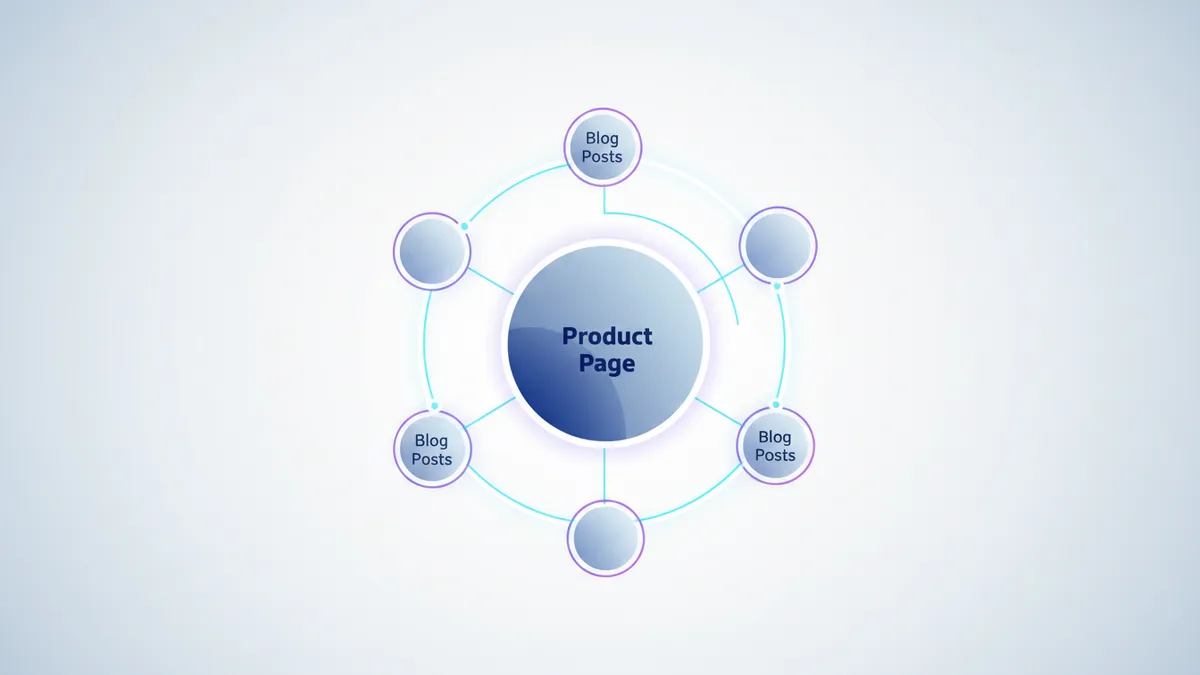
This is the direction most stores forget. If you have a blog post about content strategy, link to it from your product pages. “Learn how to build a blog content strategy that drives traffic for years.”
This adds value for the customer and creates a two-way link that strengthens both pages.
Promoting your blog posts
Publishing a blog post is step one. If nobody reads it in the first week, Google has no engagement data to evaluate. Promotion accelerates ranking.
Share on social media
Every blog post should become social media content. Share it on your social media platforms the day it publishes and again a week later.
A single blog post can become:
- 2-3 Instagram carousel slides
- A short TikTok or Reel summarizing the key points
- A Pinterest pin that drives traffic for months
- An email to your subscriber list
Plan this alongside your blog publishing schedule. If you’re using a content calendar, map blog and social content together so every post gets maximum distribution.
Build an email subscriber list

Add an email signup to every blog post. When you publish new content, email your list. This gives every post an immediate audience and initial traffic signal that helps ranking.
Repurpose for multiple platforms
One blog post should live in multiple formats. The core content stays on your Shopify blog for SEO. But the ideas get distributed everywhere.
This is where tools like IDEQO save time. Write the blog post, then use AI to generate social media content from the same material. One piece of content, five platforms.
Measuring blog SEO performance
Track these metrics monthly to know if your blog strategy is working.
| Metric | Where to Find It | What It Tells You |
|---|---|---|
| Organic traffic to blog | Google Analytics | How many visitors come from search |
| Keyword rankings | Google Search Console | Where your posts rank for target keywords |
| Click-through rate | Google Search Console | Whether your titles and descriptions get clicks |
| Time on page | Google Analytics | Whether visitors actually read the content |
| Internal link clicks | Google Analytics | Whether blog visitors explore your products |
What to expect timeline-wise
- Week 1-2: Google indexes the post. It appears in search results but usually not on page one.
- Month 1-2: The post starts picking up impressions. Rankings fluctuate as Google tests placement.
- Month 3-4: Stable rankings emerge. Long-tail keywords rank first.
- Month 6+: Primary keyword rankings improve as your site builds authority from consistent publishing.
Don’t judge a blog post’s SEO performance for at least 90 days. Early traffic will be low. That’s normal.
Common Shopify blog SEO mistakes
Writing about your products instead of your audience’s problems. “Our new collection is here!” is a press release, not a blog post. Write about what your customers care about.
No keyword research. Writing whatever sounds interesting without checking if anyone searches for it. Use data, not intuition, to choose topics. SEO tools and apps can help you find the right keywords faster.
Inconsistent publishing. Three posts in January, nothing until April. Google trusts sites that publish regularly. One post per week, every week, beats sporadic bursts.
Ignoring older posts. Blog SEO isn’t just about publishing new content. Update older posts with current information, better formatting, and additional internal links. Refreshed content can jump in rankings overnight.
No internal links to products. If your blog post doesn’t link to a single product or collection, you’re leaving money on the table. Every post should have at least one natural product link.
Skipping meta descriptions. The auto-generated version is almost always worse. Write a custom meta description for every post.
Your Shopify blog SEO action plan
- Set up your blog with a clean URL structure and editable meta tags.
- Research 10 topics using Google Autocomplete, customer questions, and competitor analysis.
- Write and publish your first 4 posts. One per week, each targeting a specific keyword.
- Internal link every post to at least one product, collection, and other blog post.
- Share every post on social media and email it to your list.
- Track results in Google Search Console starting at 90 days.
- Refresh and update older posts quarterly with new data and links.
Your Shopify blog is the most underused traffic source in your store. Every post is a new door for potential customers to find you. Start opening them.
Ready to plan your blog content alongside social media? Start free with IDEQO and build your content calendar for blog, Instagram, TikTok, and more from one dashboard. Free plan available. No credit card required.
Frequently Asked Questions
Does Shopify have a built-in blog for SEO?
Yes. Every Shopify store includes a blog feature at /blogs/news by default. You can create multiple blogs, publish posts with SEO-optimized titles and meta descriptions, and organize content with tags. It's not as powerful as WordPress, but it's more than enough to drive significant organic traffic.
How often should a Shopify store blog for SEO?
Aim for 1 to 2 posts per week. Consistency matters more than volume. A store that publishes one well-optimized post weekly for 6 months will build more organic traffic than one that publishes 10 posts in a month and then stops.
What should a Shopify store blog about?
Write about topics your target customers search for that relate to your products. A skincare brand might blog about routines, ingredient guides, and seasonal tips. A home decor store might cover styling advice and room makeovers. Focus on informational keywords that bring potential buyers to your site.
How long does it take for Shopify blog posts to rank on Google?
New blog posts typically start showing in search results within 2 to 4 weeks. Ranking on page one for competitive keywords takes 3 to 6 months. Long-tail keywords with lower competition can rank faster. Consistent publishing accelerates results because Google trusts sites that regularly add fresh content.
Is Shopify's blog good enough for SEO compared to WordPress?
Shopify's blog lacks some advanced features like categories, custom post types, and plugin ecosystems. But for most e-commerce stores, it handles blog SEO well. You get clean URLs, editable meta tags, responsive design, and auto-generated sitemaps. The content you write matters far more than the platform.